The Goal
With my deployment of Ollama under Windows I want to use it in VSCode from other machines on my LAN.
Preparing Ollama
After logging into Open WebUI | https://ollama.home.lan, Settings → Account → API Keys. Copy the JWT Token.
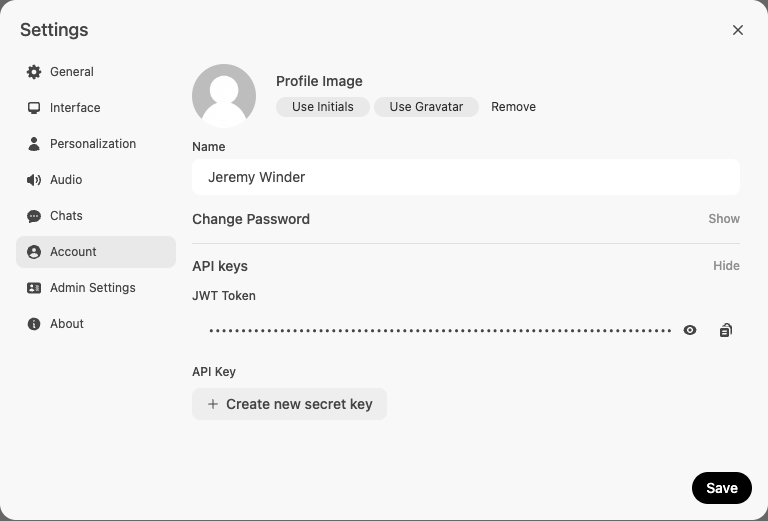
Next ensure you have the desired models available. At the time of writing this, the two I have for coding are StarCoder2:3b and DeepSeek-Coder-V2:16b
Install and configure the Continue extension
Install the Continue extension either from the VS Code Market place or extensions panel from within VS Code.
After installation edit the extension’s configuration why clicking the extension tab on the left of VS Code, then the gear at the bottom of the pannel.
This will bring up the ~/.continue/config.json file. The following is my configuration for StarCoder2 and DeepSeek-Coder-V2 models. Be sure to substitute the apiBase and apiKey.
{
  "models": [
    {
      "title": "Deepseek Coder V2",
      "provider": "openai",
      "model": "deepseek-coder-v2:16b",
      "apiBase": "https://ollama-api.home.lan/v1",
      "apiKey": "[apikey]"
    },
    {
      "title": "StarCoder2",
      "provider": "openai",
      "model": "starcoder2:latest",
      "apiBase": "https://ollama-api.home.lan/v1",
      "apiKey": "[apikey]"
    }
  ],
  "tabAutocompleteModel": [
    {
      "title": "Deepseek Coder V2",
      "provider": "openai",
      "model": "deepseek-coder-v2:16b",
      "apiBase": "https://ollama-api.home.lan/v1",
      "apiKey": "[apikey]"
    },
    {
      "title": "StarCoder2",
      "provider": "openai",
      "model": "starcoder2:latest",
      "apiBase": "https://ollama-api.home.lan/v1",
      "apiKey": "[apikey]"
    }
  ],
  "customCommands": [
    {
      "name": "test",
      "prompt": "{{{ input }}}\n\nWrite a comprehensive set of unit tests for the selected code. It should setup, run tests that check for correctness including important edge cases, and teardown. Ensure that the tests are complete and sophisticated. Give the tests just as chat output, don't edit any file.",
      "description": "Write unit tests for highlighted code"
    }
  ],
  "contextProviders": [
    {
      "name": "code",
      "params": {}
    },
    {
      "name": "docs",
      "params": {}
    },
    {
      "name": "diff",
      "params": {}
    },
    {
      "name": "terminal",
      "params": {}
    },
    {
      "name": "problems",
      "params": {}
    },
    {
      "name": "folder",
      "params": {}
    },
    {
      "name": "codebase",
      "params": {}
    }
  ],
  "slashCommands": [
    {
      "name": "edit",
      "description": "Edit selected code"
    },
    {
      "name": "comment",
      "description": "Write comments for the selected code"
    },
    {
      "name": "share",
      "description": "Export the current chat session to markdown"
    },
    {
      "name": "cmd",
      "description": "Generate a shell command"
    },
    {
      "name": "commit",
      "description": "Generate a git commit message"
    }
  ]
}
Where to go from here?
I highly recommend taking a look at the extension’s documentation at https://docs.continue.dev/ to learn how to use the extension to its fullest.